Open sourceMITruns on localhost
The open-source, AI-native terminal for traders.
Ask a question. Get a live workspace of charts, tables and option chains, and an answer that points at them. Runs on your machine, with your keys, on data sources anyone can add.
- MIT licensed
- Node 22+
- No accounts, no backend, no telemetry
- Any route · 24 recipes · 9 presets
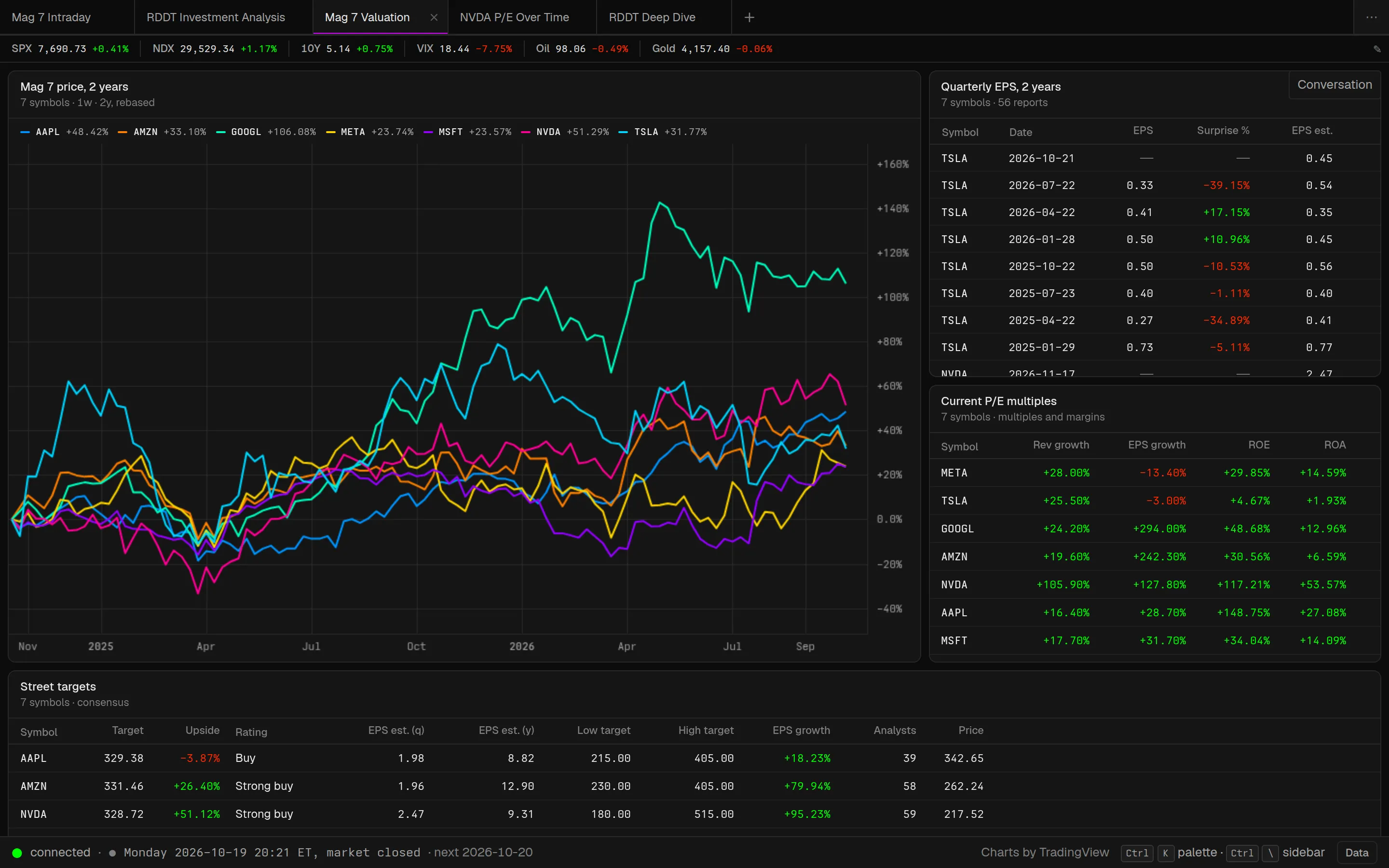
Cursor made the code editor conversational without taking the editor away. Open Terminal does the same for the trading terminal.
The prompt builds and rewrites the workspace, and the workspace stays a real terminal: every widget is a query you can open, edit and re-run by hand.
One question in, a working terminal out.
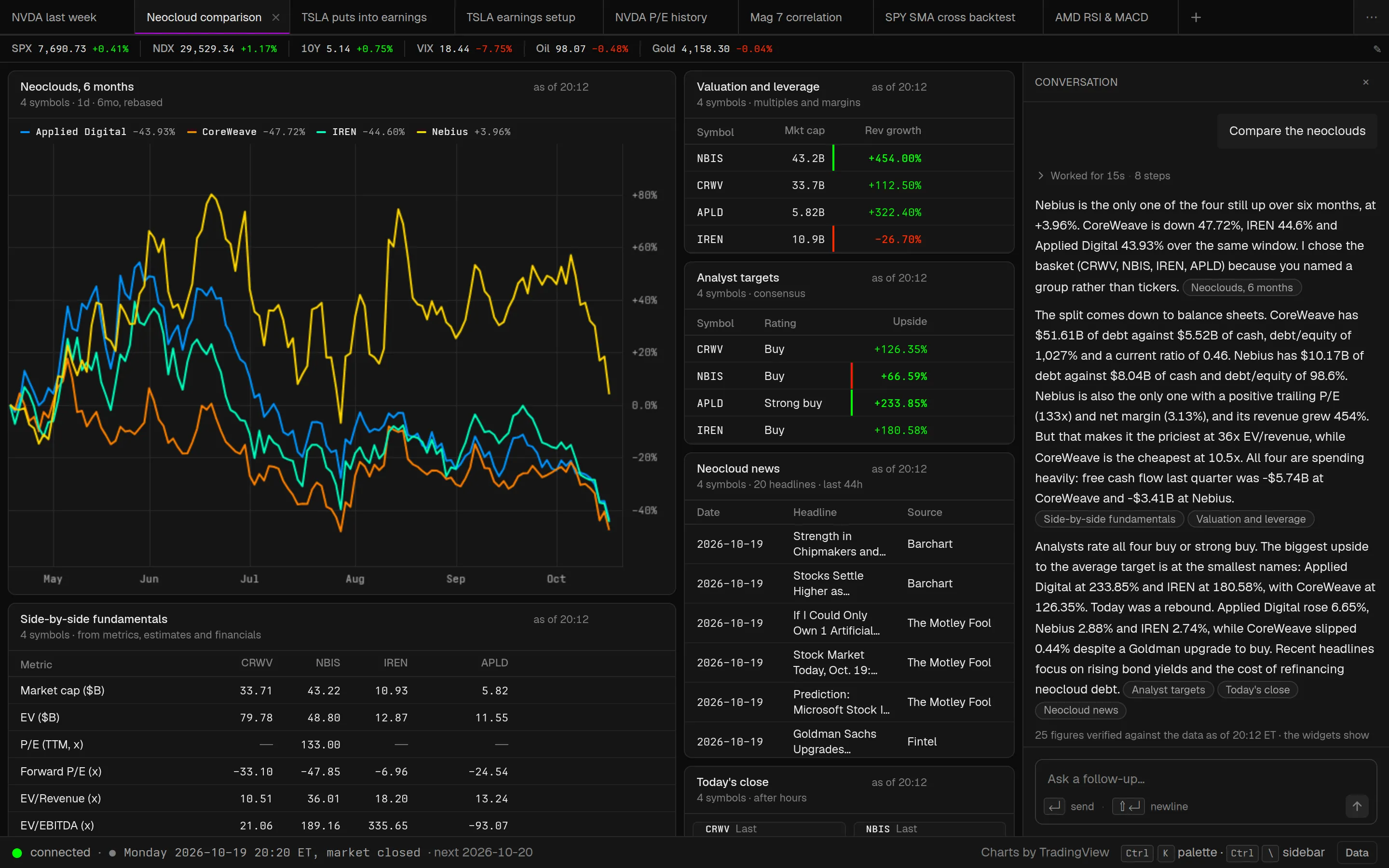
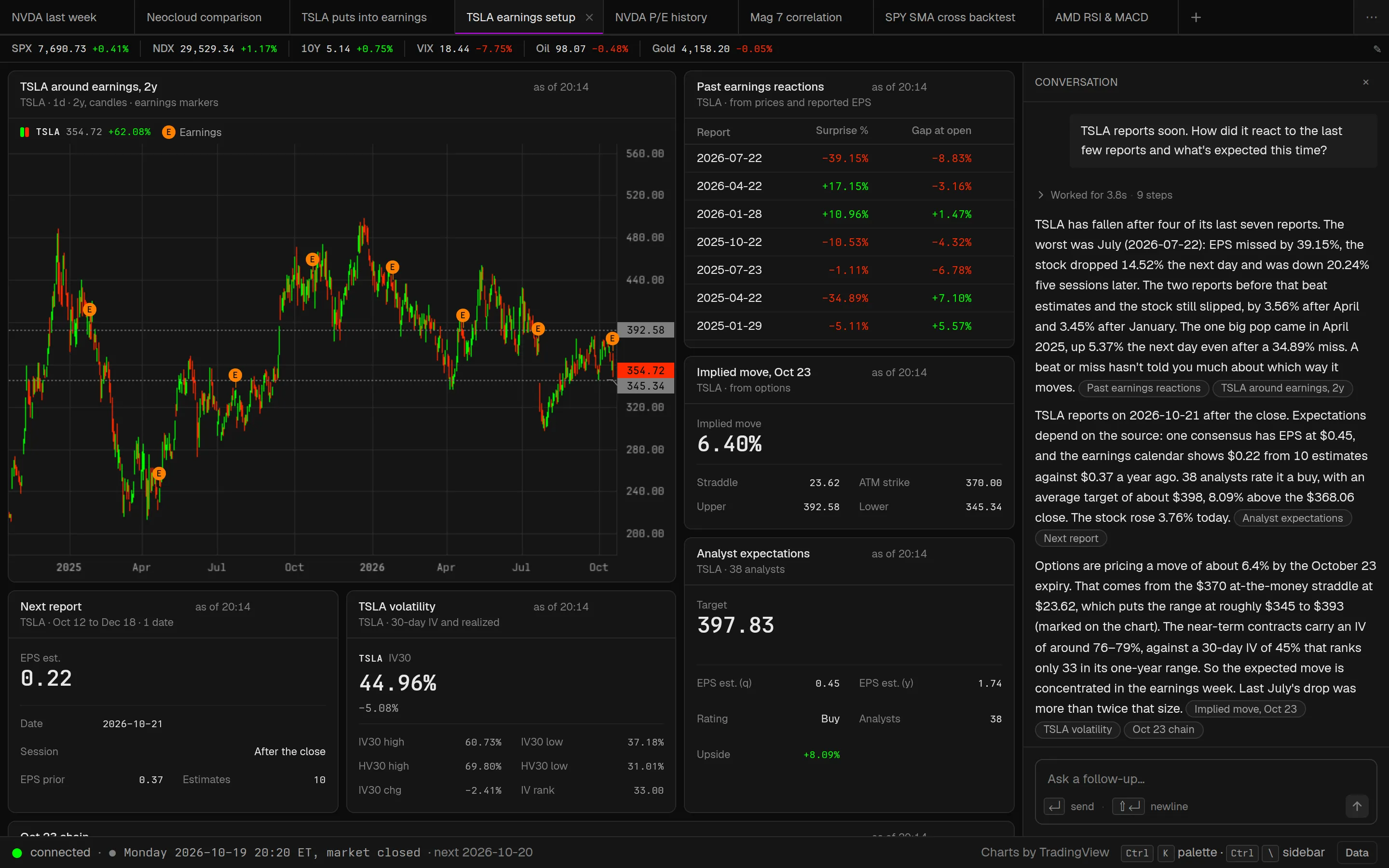
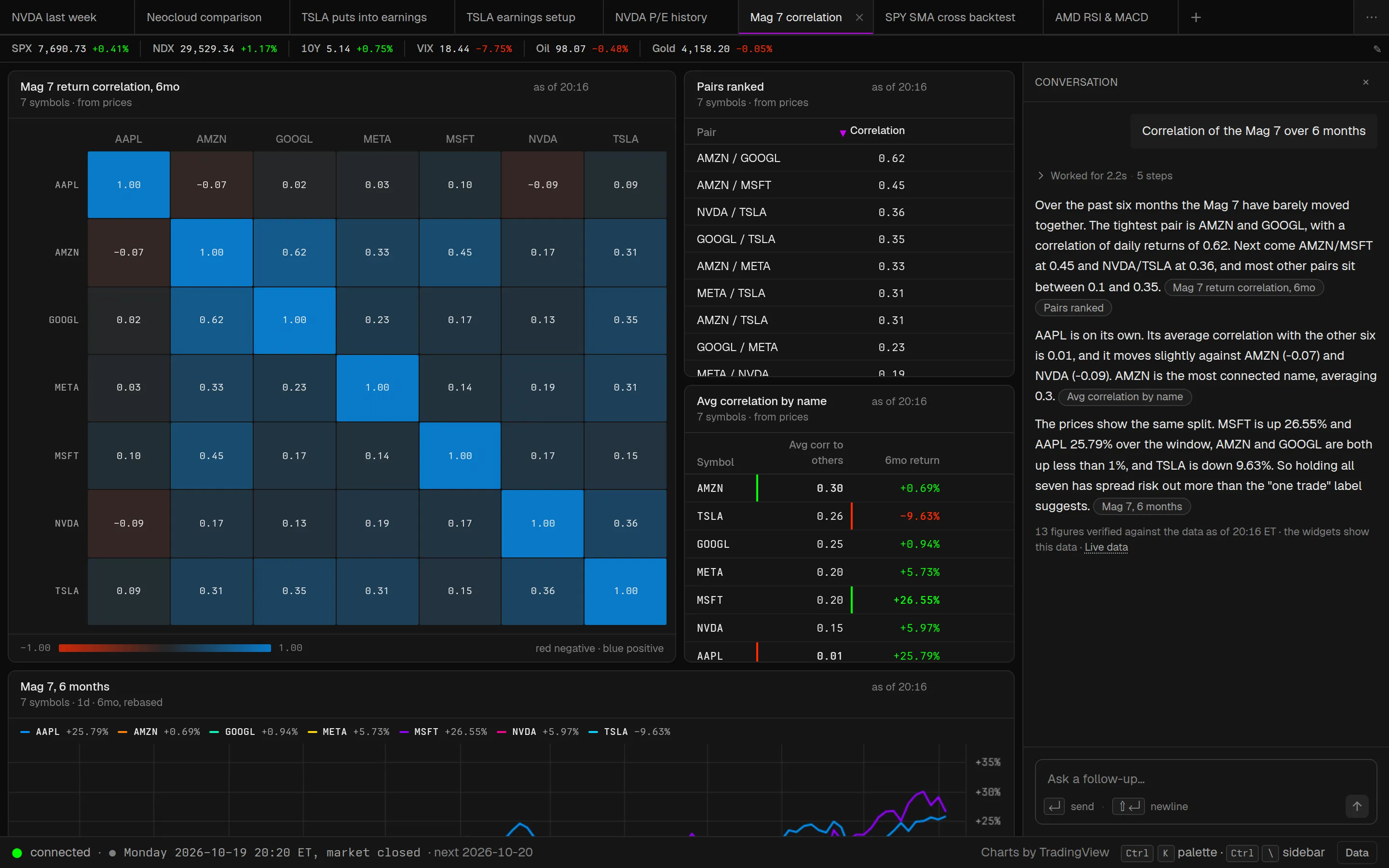
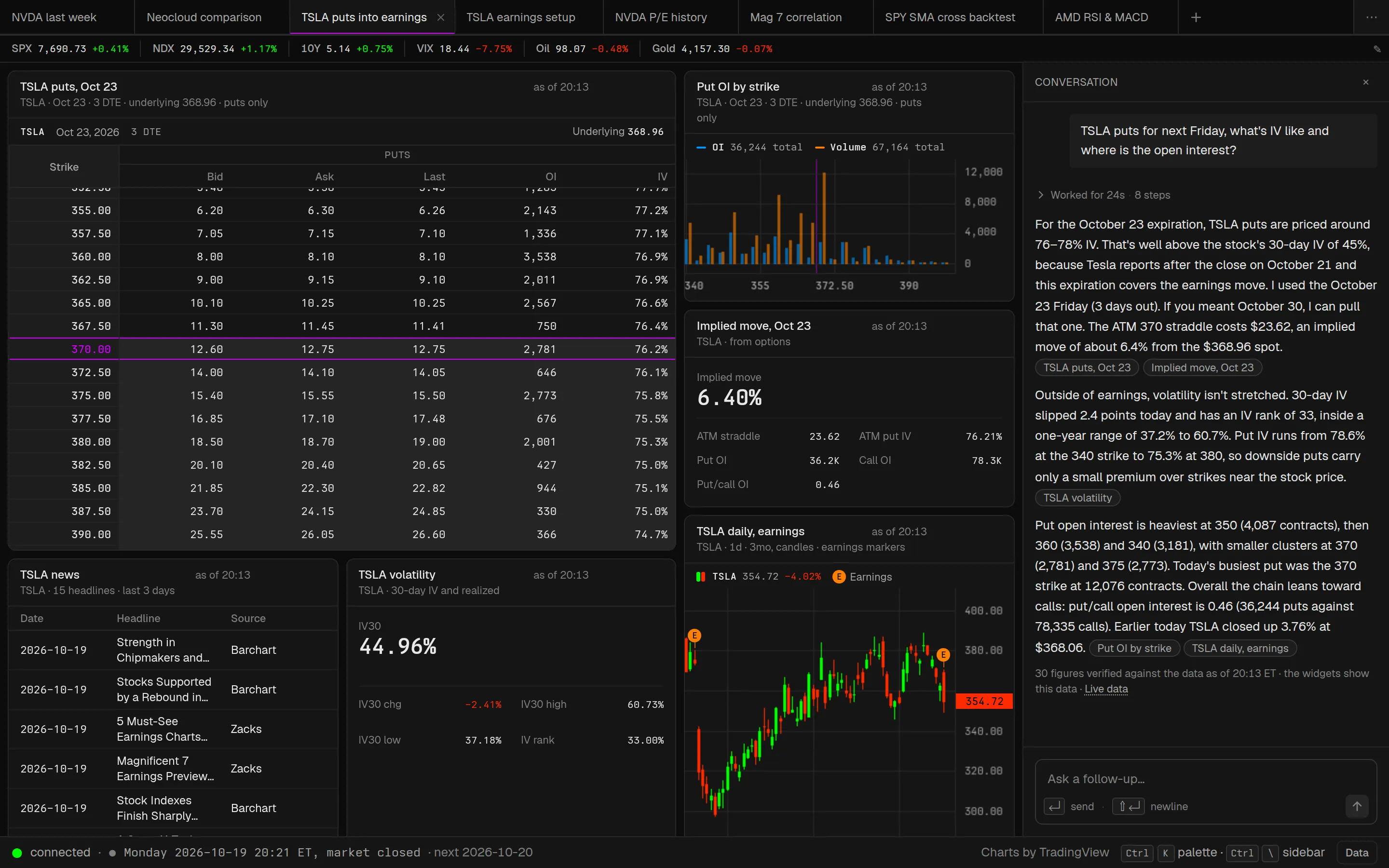
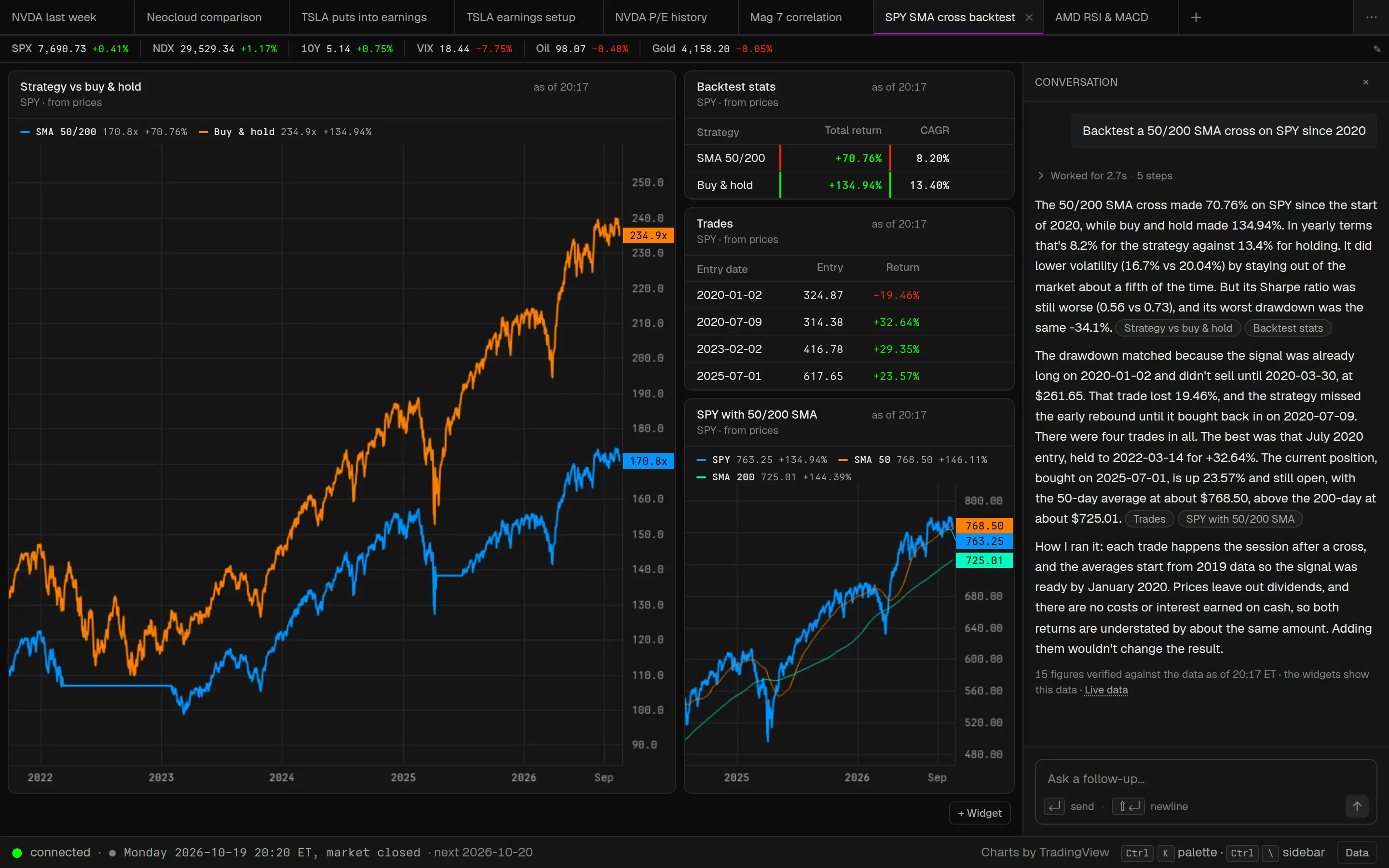
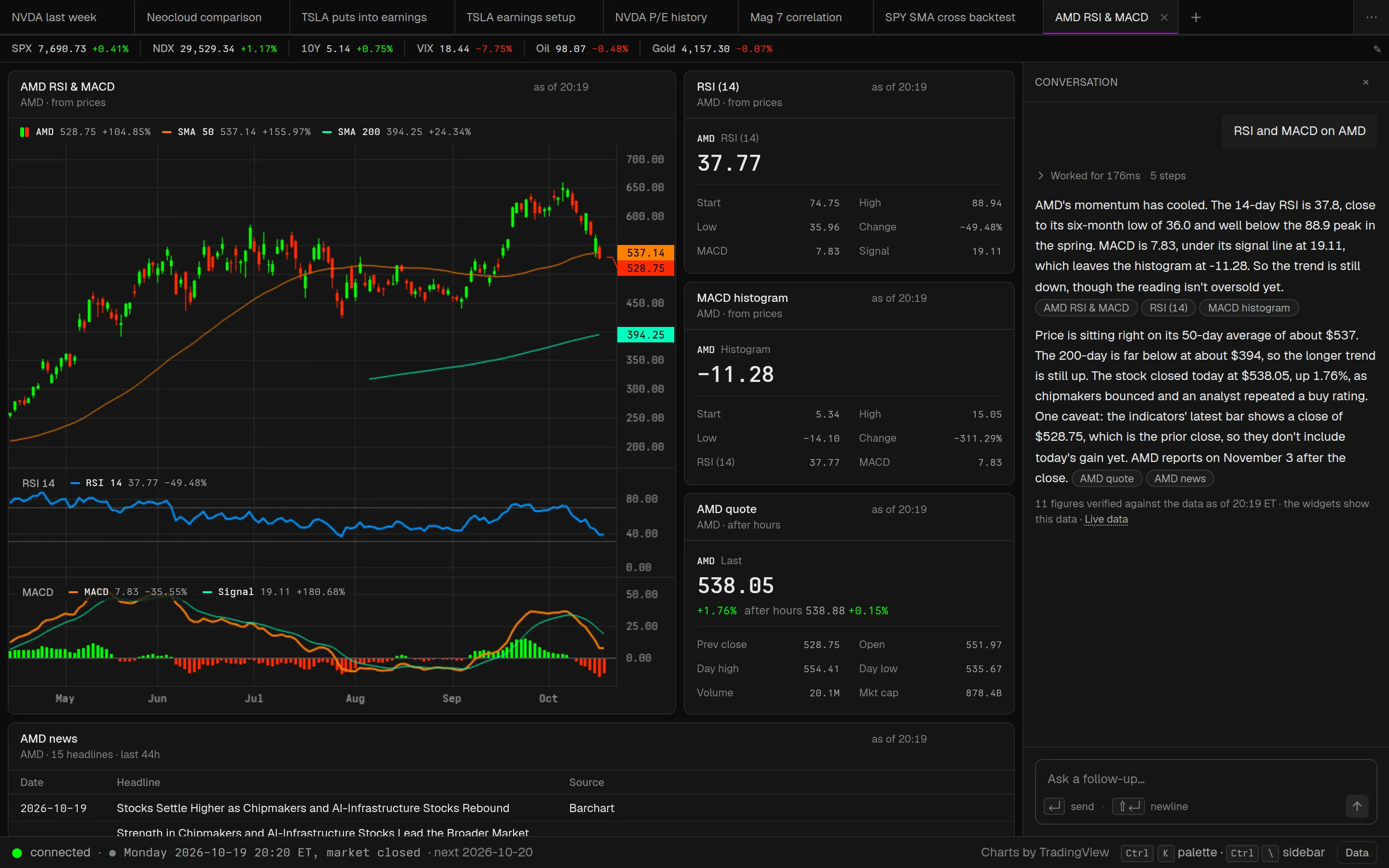
Six prompts we ran end to end on a fresh install with Claude Opus 5.5 on 2026-10-19. Every screenshot is the workspace that prompt built, with its reply beside it, and every figure in every reply was checked against the data.
A real terminal that answers back.
-
ask
Ask, don't click.
“Is NVDA's drop today news or just the market?” becomes four live widgets and a two-sentence diagnosis. A follow-up rewrites the workspace. You never assemble the answer from eight tabs again.
-
verify
Every number is traceable.
The agent cannot type a price. It can only run queries, and the reply links each claim to the widget that shows it. Figures in the reply are checked against the data it saw.
-
local
Open and local.
MIT licensed. One process on localhost plus your browser. No accounts, no hosted backend, no telemetry. Keys never leave the machine.
-
routes
Any route, not a fixed catalog.
Connectors publish their routes as descriptors (OpenBB generates 800+ from its own OpenAPI document); the agent searches them, runs them, and derives new data from them with pandas. Twenty-four recipes cover the common questions.
-
models
Model-agnostic.
Anthropic or OpenAI through the Vercel AI SDK. The default is Claude Opus 5.5; change one line of config to swap it.
-
keys
Works before you add a key.
Prices, charts, search, options and fundamentals come from Yahoo on first run. Add a free Finnhub key for news, or point it at a local OpenBB Platform for dozens of providers.
Four tools. Every figure checked.
The agent has four tools: find_route searches the catalog of every connector's routes, query runs a recipe or a route, transform runs pandas over data it already has, set_workspace replaces the widgets.
-
You type a prompt.
A question, a ticker, a follow-up. Every prompt rewrites the workspace it is asked in, and every workspace is kept.
-
Queries go to the registry.
A recipe names its routes in order (OpenBB first, Yahoo as the fallback); a route is one endpoint of one connector, its params validated against the connector's descriptor. Results come back as typed columns and rows, annotated with units and cached per route.
-
The agent reads a preview.
The columns with their units, the first rows, and per-symbol stats. Numbers in the reply must come from here, and the server verifies them.
-
It builds the workspace and answers.
Four to six widgets, each rendered by a preset, then a short reply that begins with the answer and links to the widgets it drew on. Widgets keep polling; ask a follow-up and the workspace is rewritten.
TSLA reports soon. How did it react to the last few reports and what's expected this time?
- queryrecipe volatility symbols=TSLA · 1 row5.8 s
- queryrecipe quote symbols=TSLA · 1 row6.0 s
- queryrecipe eps_history symbols=TSLA limit=8 · 8 rows6.3 s
- queryrecipe earnings from=2026-10-12 to=2026-12-18 · 1 row6.6 s
- queryrecipe estimates symbols=TSLA · 1 row7.5 s
- queryrecipe options expiration=2026-10-23 strikes=10 · 40 rows21.0 s
- transformpandas over price, eps · 7 rows21.1 s
- transformpandas over the chain · 1 row32.1 s
- set_workspace7 widgets48.1 s
Connectors 3 in the box
openbbno key for the keyless providersEvery GET route of your local OpenBB Platform API, generated from its OpenAPI document (834 on OpenBB 5.0.0).yahoono keySearch, quotes, charts, option chains and fundamentals.finnhubfree keyQuotes, company news and the earnings calendar.
A connector is one file: descriptors() plus call().
Recipes 24
- search
- quote
- ohlcv
- news
- earnings
- profile
- metrics
- financials
- estimates
- eps_history
- dividends
- insiders
- institutions
- short_interest
- options
- volatility
- calendar
- ipos
- movers
- holdings
- macro
- yield_curve
- index
- screener
Saved queries, as data. Promote any widget to your own.
Presets 9
- price
- compare
- curve
- indicator
- table
- stat
- facts
- chain
- heatmap
Any data whose shape fits renders: candles, rebased lines, yield curves, option chains, heatmaps.
Add a data source in one file.
The whole plugin surface is one function. Register the connector in ~/.openterminal/config.yml and its routes are in the catalog on the next prompt. Tests run against recorded fixtures, never the network.
- Models. Any Anthropic or OpenAI model id. The agent prompt is plain text.
- Recipes and annotations. YAML files. A new question that one route answers is a recipe, not code.
- Presets. A pure function from view options to panes and layers.
import { z } from 'zod'
import { defineConnector, inferFrame, parseDescriptors } from '@openterminal/core'
import descriptors from './descriptors.json' with { type: 'json' }

export default defineConnector({
  name: 'shape',
  config: z.object({ apiKey: z.string().min(1) }),
  descriptors: () => parseDescriptors(descriptors),
  call: async (route, params, ctx) => {
    const url = `https://api.shape.dev/${route}?symbol=${params.symbol}`
    const rows = (await ctx.http.get(url, {
      headers: { 'X-Token': ctx.config.apiKey },
      signal: ctx.signal,
    })) as Record<string, unknown>[]
    return inferFrame(rows, { connector: 'shape' }, {
      descriptor: descriptors.find((d) => d.route === route),
    })
  },
})How it compares.
| Open Terminal | Bloomberg | ChatGPT / Perplexity | OpenBB | Instinct | |
|---|---|---|---|---|---|
| Ask a question, get live views | yes | no | no | partly | yes |
| Every number traceable to data | yes | yes | no | yes | unclear |
| Open source | yes (MIT) | no | no | partly | no |
| Runs locally, your keys | yes | no | no | partly | no |
| Add a data source yourself | yes | no | no | yes | no |
| Price | free | ~$25k/yr | $20/mo | free + paid | waitlist |
From the project README. Research and monitoring only: Open Terminal places no orders.
Run it on your machine.
Clone it and start it. It works with no keys: quotes, charts, search, option chains and fundamentals come from Yahoo through the built-in yahoo connector. npx openterminal becomes the one-line start once the package is on npm; until then, run it from a clone.
-
Clone and start
shell · Node 22 and pnpm git clone https://github.com/spovalova/openterminal.git cd openterminal pnpm install pnpm devThe server starts on
:4242and the app onhttp://localhost:5173. Open it and type a ticker or a question. -
Add an LLM key
Set
ANTHROPIC_API_KEY(orOPENAI_API_KEY) in your environment, or write it to~/.openterminal/config.yml. Without one you can still build workspaces by hand in the widget editor.~/.openterminal/config.yml llm: provider: anthropic # or openai model: claude-opus-5-5 apiKey: sk-ant-... -
Add news optional
Paste a free Finnhub key on the Data page in the app. Finnhub also answers quotes and the earnings calendar, so tables survive a Yahoo outage.
-
Add everything else optional
Run OpenBB Platform on your machine (Python 3.10 to 3.12). When its API answers at
127.0.0.1:6900, its 800+ routes join the catalog and every recipe routes to it first.shell pip install "openbb[routers]" openbb-yfinance openbb-api
- NeedsNode 22+ and pnpm
- RunsOne local process and your browser
- Your data
~/.openterminal: config, workspaces, recipes, the frame cache - LicenseMIT
- Full guideQuick start in the README ↗
Your terminal. Your keys. Your machine.
Free and open source under the MIT license. Download it from GitHub, ask it a question, and open any widget to see the query behind it.